Sunday, June 16, 2013

Popplet in Art

Second grade students experimented with art materials and the Popplet app on the ipads.  Our first art class was spent experimenting with the art materials.  I made two stations, one with watercolors and one with cray-pa.  I asked the kids to experiment with different ways to use the materials and write down things that they discovered.  These are not new to use, we have used cray-pa and watercolors before but the focus was on using the materials in different ways and not what their papers looked like.  After half of the class the kids switched to the other art material.
The next art class I laid out our practice papers and their writing pages and introduced them to the application Popplet on the ipad.  We talked about what a mind map is and how we can create them using this app.  Popplet is a fun and easy app to use.  The kids were able to use it very easily.  I paired them up and each group chose one of the art materials to make a mind map about.  I asked them to come up with four qualities about their art material for their Popplet.  We only have a 40minute class so I had to limit them so that we would be able to save them to the camera roll and then upload to Dropbox.  I highly recommend this app and I am looking forward to using it in the art room again next year.  Here are some of our finished Popplets:


The next art class I let students make a finished piece of art using one or both of the art materials thinking about applying some of the things they learned in their practice.  Here are a few of their pictures.  This was our last art class of the year so I think the results might be even better if we had more time and no summer fever :)


Saturday, June 15, 2013

Clay Initial Tiles

One of our last projects of the year and a great review of clay techniques.  The kids loved this project.  They could decorate the tile any way that they wanted; change the shape, press objects into the clay or add more clay.  The only requirement was that they had to add an initial.  It could be theirs, a friends, uppercase, lowercase, both initials, ect.  I wanted to give them lots of freedom to be as creative as they liked.  I think this was a great review in rolling coils, attaching clay and creating textures in clay.
They really turned out great.  I will definitely do this lesson again.


Wednesday, June 12, 2013

Bug Movie with Doink app

I have been experimenting with the Do Ink app on the ipad and thought it would be fun to let the students give it a try.  I'm still learning myself so I wanted to pick something easy to try.  I saw Tricia Fuglestad's post on her Aliens in the Art Room and thought maybe I could do a simplified version.  We were already creating bugs out of paper so I thought that would be a perfect subject.  Next time I would like to have the bug's legs or wings moving but for now we just practiced duplicating layers and moving the bugs in the same way that we did in our stop motion animations using the My Create app.  I hope to spend more time with the app this summer learning all the great things it  has to offer.  Here is our video.  The kids had a great time with it.


Monday, June 10, 2013

Clay Birds in a Nest

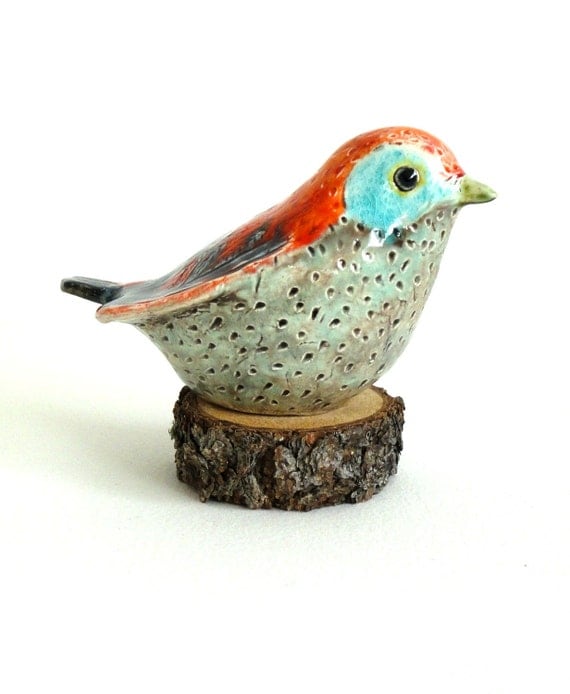
In second grade our students learn about birds.  Each student is assigned a particular bird to research and create a board game.  I was looking on Pinterest one day and found these really cute clay birds.  Here is the link to the Etsy site:  http://www.etsy.com/listing/120121796/sale-clay-bird-sculpture-turquoise.


As soon as I saw it I knew I wanted to make them with my students.  While making the clay birds we really practiced modeling the clay with our hands.  We talked about how we could push, pinch and pull the clay to form the bird shape.  I found a great graphic that I used to show my students one way to create the bird.  Here is the site where I got this picture.  I think it really helped the kids visualize the process:https://blogger.googleusercontent.com/img/b/R29vZ2xl/AVvXsEgIJpvJb_wsAmgXm7JGBRIGUw6tl4hXDN_07JnfsGmMkoxwDxTXNrktmntmKzQIxcpEYW5CdfTkNxEyxCFcwSK4f6rZL5RUFMRhtMHjeFZo1dKE3-KNqBWkpe7tOoJiwCBXFiDvVvSET28E/s1600-h/genine4.jpg


I also found these great clay bird nests on Pinterest, here is the link: 
 and decided to make those to put our birds in.  If you are a bird lover you should really check out her blog.  There are so many beautiful photos.  Each student got a small slab circle of clay,turned the edges up and added clay strings made from garlic presses.  It was great practice attaching clay.
The kids really loved making both the birds and the nests. We practiced lots of handbuilding skills. Here are some of our finished birds.  If you would like to see more visit our Artsonia exhibit Clay Birds.


Sunday, May 26, 2013

First Grade and NH Animals

First grade students at our school study NH animals.  Every year the kids create their animal out of Model Magic.  Usually we create 3D animals but this year I decided to have them create a relief of their animal onto cardboard.  See my earlier post on how we made them. 
The students made careful sketches of their animal before we made them out of clay.  We used those sketches to trace onto foam plates and make NH animal prints.  We talked about basic printmaking tools; brayer, ink and bench hook.  This was a very exciting process for the kids to watch.  
We also helped make habitat murals for their classrooms.  We used large paper and cray-pa to draw details for pond, field and forest habitats and then liquid watercolors to fill in the background.  We got another use out of our animal sketches.  We colored them in and glued them into the mural and used scraps to add more details.

NH Animal Relief

NH Animal Prints


Fourth Grade Tessellations

My fourth grade students looked at the work of MC Escher and created some of their own tessellations. After we made our shape we brainstormed what kind of animal we could turn it into.  This was both challenging and fun.  We used sharpie and twistable crayons to add color.  I asked my students to have some sort of pattern to their coloring.
Another fun app I found for the ipad is Amaziograph.  I thought it was a great complement to this lesson.  This app allows you to create drawings without symmetry, radial designs, and tiling symmetry designs (tessellations).   We focused on the tiling symmetry designs.  There were three different options to choose from.  The kids really loved this app.  Some other fun aspects of the app are color  mixing and playing with the brush softness and opacity.
Student Artwork

Amaziograph Creations

Tuesday, May 21, 2013

Videolicious App

This is a fun app to make and share videos. It is very easy to use and you can insert photos and videos. You can also add a clip of yourself explaining the video as well as music. The only downfall is you can only do a one minute video. I still think it would be great for students to create videos about their artwork with a reflection piece by them. Here is quick video I did skip the part where you can insert yourself talking about the slideshow. I think this app has great potential in the art room and will definitely try something with the kids some time.  Here is the website with information on this app:  https://videolicious.com/