My son introduced me to this fun artist. He came home talking about an artist he learned about in art class at his school. He liked him so much I decided to look him up. I immediately knew that my kids would love looking at his whimsical city scapes too. My son's project was done in watercolors but I adapted it to be a mixed media project. They came out great. The kids were so into them and added lots of details that made them all so different. Here are some photos of the finished pieces. If you would like to see all of them you can visit our online gallery here: http://www.artsonia.com/museum/gallery.asp?project=1157672
Showing posts with label grade 2. Show all posts
Sunday, June 12, 2016
Saturday, February 6, 2016
Second Grade Fruit and Vegetable Drawings
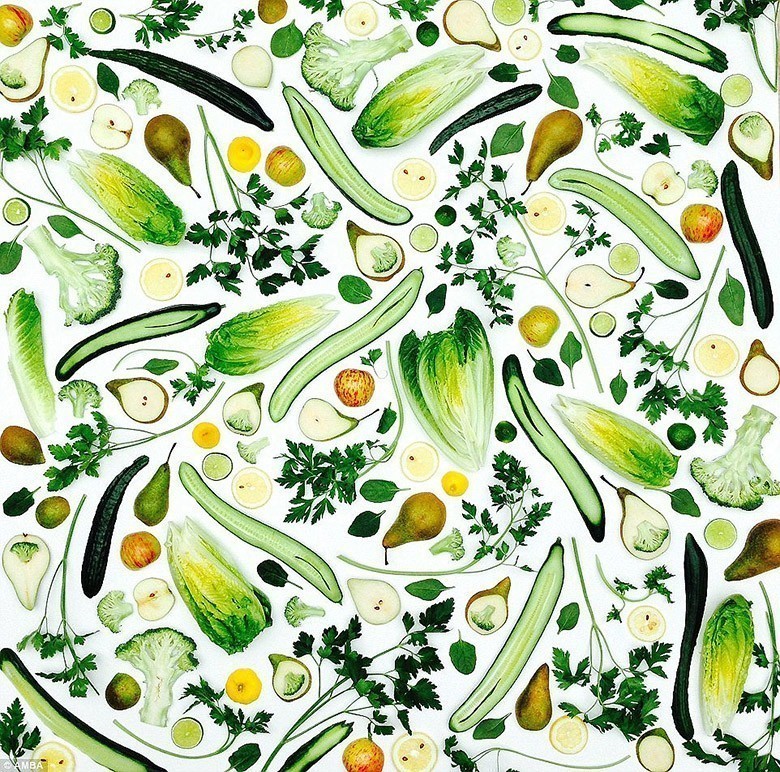
This project was inspired by two things, a beautiful painting by Miroco Machiko, a Japanese artist and illustrator and a healthy foods unit taught by our PE teacher and school nurse. I loved the simple shapes and bright colors of this print and thought the children would love it as well. I also showed them Artist photographer, Amber Locke's Geometric plant compositions of raw fruits and vegetables.
We used coloring book pages of fruits and vegetables at first to draw so that we could focus on shape. Once we went on to final copy paper I brought in some real food so that we could observe the different colors and textures. The kids really enjoyed having the fruit and vegetables to look at. We will hang these up in the hallway with some healthy eating tips. Here are some photos of our inspiration pieces and some of the kids work. You can see all of our artwork on the Artsonia site.
Monday, December 28, 2015
Fun Way of Displaying Second Grade Owls
Love the way the owls look on these cut trees. It makes for a great display of artwork in the library. The second grade students did such a great job. Love the way they look in a group. If you want to see all of them go to: http://www.artsonia.com/museum/gallery.asp?project=1046948
Sunday, October 4, 2015
Second Grade Robots
This lesson is always a hit with the kids. This year we did the background a little differently. You can find previous years robots here. I really wanted the robots to stand out from the background so we used black paper and metallic paints to print gear-like designs. I collected some found objects; Lego and Kinex pieces, cardboard and plastic lids. The kids dipped the objects in the paint and pressed them onto the black paper. They were the perfect backgrounds for these cool robots. Here are a few of the finished products and you can check out the rest on Artsonia.
Sunday, April 19, 2015
Imaginary Animals
Second grade students combined real animals to create these fun imaginary ones. The coloring was done with color pencil and we talked about layering different colors and lines to come up different textures for these creative creatures. I showed them Carla Sonheim's book,
Drawing and Painting Imaginary Animals: A Mixed-Media Workshop and talked about how she layered color to textures to her creatures. For the background we used watercolors and a palette to mix lighter shades. This filled in the background nicely and let our animals stand out. Here are some of the finished ones. You can also see all of them on Artsonia.
Tuesday, March 17, 2015
Second Grade Self-Portraits and Chatterpix Kids
My second grade students just finished their self-portraits. After looking at a variety of portraits and sketching practice students were asked to create a self-portrait that communicates personal interests. They were also asked to choose what painting material they wanted to use. We spent a class period practicing with both mediums and then discussed the qualities of both. Most of the kids chose tempera paint for their portraits. They found the watercolors frustrating. This project was quite the challenge but the kids did a great job. I found a great app called ChatterPix. It's a photo app that allows you to make your image talk. You can also add filters, text and stickers. This app was easy to use and a great way for students to present their artwork and discuss what was meaningful to them. Once each student made their individual ChatterPix I used iMovie on the iPad to put them together into one little movie. Here are a few pictures of our self-portraits and examples of ChatterPix. You can see all of the class movies here:https://sites.google.com/a/bownet.org/besart1/home/grade-2
Sunday, November 9, 2014
Clay Owls- Two different Ways
Second grade students created clay owls after working on their Owl Close Up pictures in cray-pa. Last year we made these from slabs of clay and this year was going to be the same...until my slab roller broke and I had only enough for 2 of my four classes. I looked online and found another owl project made more like a pinch pot and decided to give it a try. I found this great website that had pictures of the process. If you ever teach a project about birds this site is amazing; http://redandthepeanut.blogspot.com/2013/09/how-to-make-ceramic-pottery-owl-out-of.html
Both types of owls came out great. I think the slab owls are easier for the kids but I think most of them would have chosen the 3D one. They both allowed for the kids to practice attaching clay with slip and score and were a great review of adding texture and a great follow up to our 2D owl project.
Here are a few of them:
Tuesday, October 14, 2014
Owl Close Ups
Second grade students worked on zooming in on an object when drawing. We also looked at some great owl paintings I found on Etsy. Each student chose an owl photograph to look at and practiced sketching enlarged views. Final drawings were put on brown construction paper and we used oil pastels to add color. The focus was on observing the colors, patterns and textures of the owls.
Sunday, May 4, 2014
Pixel Portraits
Second grade students had fun creating pixel portraits using graph paper and the iPad app Pixel Booth. At first it was a little bit of a challenge to think of making their people using the square shape instead of using lines. I also found an online pixel drawing site that the kids could use on my Smart Board. Students took turns using the iPad app while they were drawing on the graph paper. I think they turned out great and the kids had a lot of fun making them.
Sunday, January 26, 2014
Second Grade Snow Angels
I found this great art project at Deep Space Sparkle, an art blog that I love to read. As soon as I saw it I knew I had to do it with my kids. It was the prefect winter project. I purchased the book and lesson from the site. I highly recommend her site. She has lots of great lesson ideas for art teachers but also lots of great ideas parents could do at home with their kids.
This lesson was great for teaching value and symmetry as well as practicing painting and collage techniques. The kids had a great time creating and they all came out great. Here are a few of them. To see them all just visit our project page on Artsonia.
Thursday, December 26, 2013
Winter Starry Night
My second grade students looked at Vincent van Gogh's Starry Night picture. We used cray-pa and watercolor resist to create our night skies and then collaged our trees and villages on top. Details were then added with color pencil. We also used white paint for snow and a little glitter glue to add sparkle to the moon and stars.
I tried to encourage my students to add some things that they noticed about van Gogh's artwork into their own. Many of them added texture, used different lines similar to his brushstrokes, and added different shades of colors in the sky, stars and trees.
As a review we used the app Popplet on the iPad to make mind-maps about what inspired them about starry night.
I tried to encourage my students to add some things that they noticed about van Gogh's artwork into their own. Many of them added texture, used different lines similar to his brushstrokes, and added different shades of colors in the sky, stars and trees.
As a review we used the app Popplet on the iPad to make mind-maps about what inspired them about starry night.
Saturday, November 23, 2013
Clay Owls
When I saw this pin on Pinterest I knew it would be the perfect project for my second grade students. It was a great follow up to our mixed media owl projects. I had done a similar technique in the past but we made penguins instead of owls. The kids really had a great time making these. They really looked closely at owls and how they could create some of the feather textures in the clay using found objects. Some of the skills that we worked on were; creating texture in clay, clay can be pinched or pulled, and a review of the clay process; firing, underglazes and glaze.
Monday, October 14, 2013
Owls
In second grade we have been talking a lot about texture. When we were drawing our owls we really looked at the feather patterns and textures. We also added more visual texture to our trees with brown crayon. While creating our collaged backgrounds we used torn paper towels from an earlier project that added another texture element to the project. They came out great and the kids really worked hard on adding details.
Sunday, September 29, 2013
Art Room Robots - Grade 2
Students designed robots to help out in the art room. We talked about all of the materials we use in art and what types of clean up jobs our robots could do. Our robots clean the floor, the paintbrushes, sharpen pencils, stack chairs, pick up clay scraps, unclog glue bottles and lots of other helpful jobs. We really tried to make sure that the details in our pictures helped show the robots job.
I used the Fotobabble app on the ipad as a way for students to share their robots with others. Fotobabble is an easy app that adds sound to any photo. Once I had their photos and recordings I made QR codes that linked their artwork to the recording. I printed the codes and attached them to the artwork. During class I allowed 4 students at a time to scan the codes and listen to other classes robots.
![]() |
| QR Code |
Sunday, June 16, 2013
Popplet in Art
Second grade students experimented with art materials and the Popplet app on the ipads. Our first art class was spent experimenting with the art materials. I made two stations, one with watercolors and one with cray-pa. I asked the kids to experiment with different ways to use the materials and write down things that they discovered. These are not new to use, we have used cray-pa and watercolors before but the focus was on using the materials in different ways and not what their papers looked like. After half of the class the kids switched to the other art material.
The next art class I laid out our practice papers and their writing pages and introduced them to the application Popplet on the ipad. We talked about what a mind map is and how we can create them using this app. Popplet is a fun and easy app to use. The kids were able to use it very easily. I paired them up and each group chose one of the art materials to make a mind map about. I asked them to come up with four qualities about their art material for their Popplet. We only have a 40minute class so I had to limit them so that we would be able to save them to the camera roll and then upload to Dropbox. I highly recommend this app and I am looking forward to using it in the art room again next year. Here are some of our finished Popplets:
The next art class I let students make a finished piece of art using one or both of the art materials thinking about applying some of the things they learned in their practice. Here are a few of their pictures. This was our last art class of the year so I think the results might be even better if we had more time and no summer fever :)


Monday, June 10, 2013
Clay Birds in a Nest
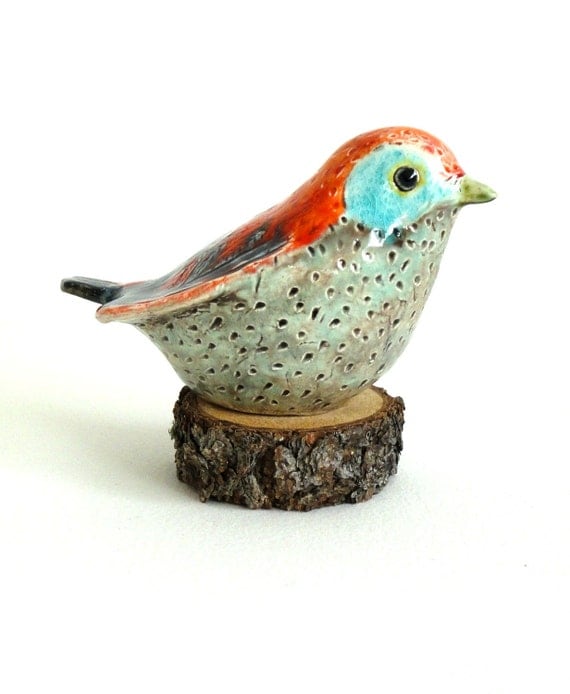
In second grade our students learn about birds. Each student is assigned a particular bird to research and create a board game. I was looking on Pinterest one day and found these really cute clay birds. Here is the link to the Etsy site: http://www.etsy.com/listing/120121796/sale-clay-bird-sculpture-turquoise.
As soon as I saw it I knew I wanted to make them with my students. While making the clay birds we really practiced modeling the clay with our hands. We talked about how we could push, pinch and pull the clay to form the bird shape. I found a great graphic that I used to show my students one way to create the bird. Here is the site where I got this picture. I think it really helped the kids visualize the process:https://blogger.googleusercontent.com/img/b/R29vZ2xl/AVvXsEgIJpvJb_wsAmgXm7JGBRIGUw6tl4hXDN_07JnfsGmMkoxwDxTXNrktmntmKzQIxcpEYW5CdfTkNxEyxCFcwSK4f6rZL5RUFMRhtMHjeFZo1dKE3-KNqBWkpe7tOoJiwCBXFiDvVvSET28E/s1600-h/genine4.jpg
I also found these great clay bird nests on Pinterest, here is the link:
and decided to make those to put our birds in. If you are a bird lover you should really check out her blog. There are so many beautiful photos. Each student got a small slab circle of clay,turned the edges up and added clay strings made from garlic presses. It was great practice attaching clay.
The kids really loved making both the birds and the nests. We practiced lots of handbuilding skills. Here are some of our finished birds. If you would like to see more visit our Artsonia exhibit Clay Birds.
Monday, April 22, 2013
Mixed Media Collage
Second grade students looked at the work of Henri Rousseau for inspiration on this project. We talked about his use of overlapping and value. I love mixed media projects because students get a chance to practice using lots of different art materials. We used tempera paint for our animals, watercolor wash for the backgrounds and construction paper and crayons to create the collage.
Sunday, March 24, 2013
Sun Faces
For this project we really focused on the process of coming up with ideas and trying to make our sun faces unique and different. Often in class students are quick to use the first idea that they come up with. I was trying to get them to slow down and brainstorm lots of ideas before settling on their favorite. I made a worksheet that I thought might help them with this process. I also showed them some terra cotta sun faces and we talked about how different they all were. I didn't leave the sun faces out while they were drawing though because I wanted to try to get the most original ideas. The kids came up with some great ideas and very different sun faces. I think taking the extra time to do a little more planning helped.
Here are the planning worksheets:
![]() |
After our sun faces were finished we photographed and edited them on the ipad using the Popsicolor app. It's a fun app that gives the look of watercolor and ink. The students enjoyed giving their artwork another different and creative look.
Saturday, February 16, 2013
African Textiles
In March our school is having an artist in Residence who will be teaching us about African Drumming which inspired us to create artwork about African Textiles. First grade students learned about Kente Cloth. We watched a video of an African boy weaving and looked at lots of pictures of the woven cloth. Students created their strips and decorated them using different types of lines and then wove them into a black piece of paper. I saw a version of this lesson on Artsonia. Here is the link: http://www.artsonia.com/museum/art.asp?id=15678256&exhibit=447434&gallery=y
Second grade students created printed patterns inspired by African Mudcloth. I found this great site that explains the process of making the cloth: http://www.mnh.si.edu/africanvoices/mudcloth/index_flash.html
We used cardboard and white paint to print the patterns and oil pastels to add some color. Here is a little video of a student working on their pattern. I used the imotion HD app on the ipad to make it.
Second grade students created printed patterns inspired by African Mudcloth. I found this great site that explains the process of making the cloth: http://www.mnh.si.edu/africanvoices/mudcloth/index_flash.html
We used cardboard and white paint to print the patterns and oil pastels to add some color. Here is a little video of a student working on their pattern. I used the imotion HD app on the ipad to make it.
Fourth grade students looked at Adinkra cloth. We watched a few youtube videos of the cloth being stamped as well as some photographs of the cloth and stamps. I printed a sheet of the Adinkra symbols and their meanings for my students to use. Each student chose a piece of cloth (recycled from a past project) and used the symbols and sharpie to decorate their cloth. The students will wear these when they are doing their drumming.
Tuesday, December 18, 2012
Artwork with a Medieval Theme
Second grade students had fun creating artwork with a Medieval theme. I found two of these great lessons at one of my favorite blogs, Deep Space Sparkle. Here is the link for the painted royalty lesson and you can also find her castle collage lesson there too.
http://www.deepspacesparkle.com/2012/01/09/fairy-tale-kings-and-queens-art-project/
It was fun creating artwork with the same theme using different materials; collage, clay and tempera paint.
Subscribe to:
Posts (Atom)